

KPI Tracking for Virtual Assistants: How to Measure VA Performance
Hiring a virtual assistant can help a business save time, handle repetitive tasks, and keep daily operations moving. But once a VA becomes part of your team, one important question comes up:
How do you know if your virtual assistant is actually performing well?
The answer is not simply counting how many hours they work. For business owners, especially those managing remote teams, it is important to look at results. This is where KPI tracking for virtual assistants becomes useful. Key performance indicators, or KPIs, give you a simple way to measure whether your VA is meeting expectations, completing work accurately, and contributing to your business goals.
In this guide, we’ll explain what VA KPIs are, which ones are worth tracking, and how to build a simple KPI system that does not create unnecessary work for you or your team.
What Are KPIs for Virtual Assistants?
A KPI, or key performance indicator, is a measurable value used to evaluate performance.
For virtual assistants, KPIs can help measure things such as:
- How quickly tasks are completed
- How accurately work is done
- How many customer inquiries are handled
- How quickly emails are answered
- How many appointments are scheduled
- Whether deadlines are being met
- How much work is completed within a set period
The right KPIs depend on what your VA does. For example, a VA handling customer support may be measured by response time and customer satisfaction. A real estate VA may have KPIs related to lead follow-up, property listings, applications, or database updates. The goal is not to track everything. The goal is to identify the numbers that actually tell you whether the work is producing the expected results.
Why KPI Tracking Matters for Virtual Assistants
Without clear performance measures, it can be difficult to know whether a VA is doing well. You may notice that tasks are being completed, but you may not know if they are being completed quickly enough or accurately enough. You may also spend time checking work manually because expectations were never clearly defined. KPI tracking can help solve this problem.
1. It creates clear expectations
A VA should know what success looks like. Instead of saying, “Please follow up with leads,” you can define a measurable target, such as following up with new leads within a specific timeframe. Clear expectations make it easier for both the business owner and the VA to understand what needs to be done.
2. It makes performance easier to evaluate
KPIs give you something objective to review. Instead of relying only on impressions like “I feel like things are moving slowly,” you can look at actual results. This can make performance conversations more productive and less personal.
3. It helps identify problems early
A sudden drop in completed tasks, slower response times, or an increase in errors can signal that something needs attention. The problem may be the VA, but it may also be unclear instructions, an inefficient process, too much work, or a lack of training. KPIs can help you identify where to investigate.
4. It helps businesses improve processes
KPI tracking is not only about evaluating employees. If a VA consistently struggles with a particular task, the process itself may need improvement. For example, if a VA spends too much time updating information across several systems, the business may be able to simplify the workflow or create a better SOP.

Important KPIs to Track for Virtual Assistants
There is no single KPI list that works for every VA. However, several performance metrics are useful across many types of virtual assistant roles.
Task Completion Rate
This measures how many assigned tasks are completed within a specific period. For example, if a VA is assigned 50 tasks in a week and completes 47, the completion rate is 94%. This can help you understand whether the VA is keeping up with their workload. However, avoid looking at this number by itself. Completing 100 tasks does not mean much if many of them contain errors.
Accuracy Rate
Accuracy is especially important for administrative work, data entry, bookkeeping support, property management, and other detail-heavy tasks. You can track the number of errors found during a specific period. For example:
100 records processed
2 errors found
98% accuracy
The exact target will depend on the type of work, but tracking accuracy can help prevent small mistakes from becoming larger problems.
Turnaround Time
Turnaround time measures how long it takes to complete a task. This can be useful for tasks such as:
- Responding to customer inquiries
- Processing applications
- Updating listings
- Preparing reports
- Completing administrative requests
If a task normally needs to be completed within one business day, the KPI should reflect that expectation.
Response Time
For customer-facing VAs, response time can be one of the most important metrics. You might track the average time it takes to respond to:
- Emails
- Website inquiries
- Customer messages
- Support requests
- Lead inquiries
Fast responses can be particularly important when the VA is responsible for handling leads or customer questions.
Follow-Up Rate
For VAs working in sales, real estate, recruiting, or lead management, follow-up activity can be a useful KPI. For example, you could track:
- Number of new leads received
- Number of leads contacted
- Number of follow-ups completed
- Number of leads that received multiple follow-ups
This gives you a clearer picture of whether leads are being properly managed.
Customer Satisfaction
If your VA interacts directly with customers, consider tracking customer satisfaction. This can be measured through customer surveys, ratings, feedback, or the number of complaints received. Customer satisfaction should not necessarily be the only measure of performance, but it can provide valuable information about the quality of the customer experience.
Deadline Compliance
A VA may complete a large amount of work but still cause problems if important deadlines are missed. Track whether recurring or time-sensitive tasks are completed on schedule. This is particularly useful for tasks involving appointments, reports, billing, property management, and other business operations.
How to Set the Right KPIs for Your VA
The best KPI system starts with the VA's actual responsibilities. Start by asking:
What is this person responsible for?
Make a list of the VA's main duties. Then identify which responsibilities can be measured. For example, if a VA handles email management, useful KPIs may include response time, inbox processing volume, and accuracy. If the VA manages administrative tasks, you may focus on task completion, deadlines, and error rates. If the VA supports a real estate business, KPIs might include lead response time, follow-up completion, listing updates, application processing, and data accuracy.
Keep the list manageable. Tracking 15 or 20 KPIs can create more work than value. For most roles, a small number of meaningful KPIs is easier to understand and maintain.
Set Clear Targets
Once you choose your KPIs, decide what acceptable performance looks like. For example:
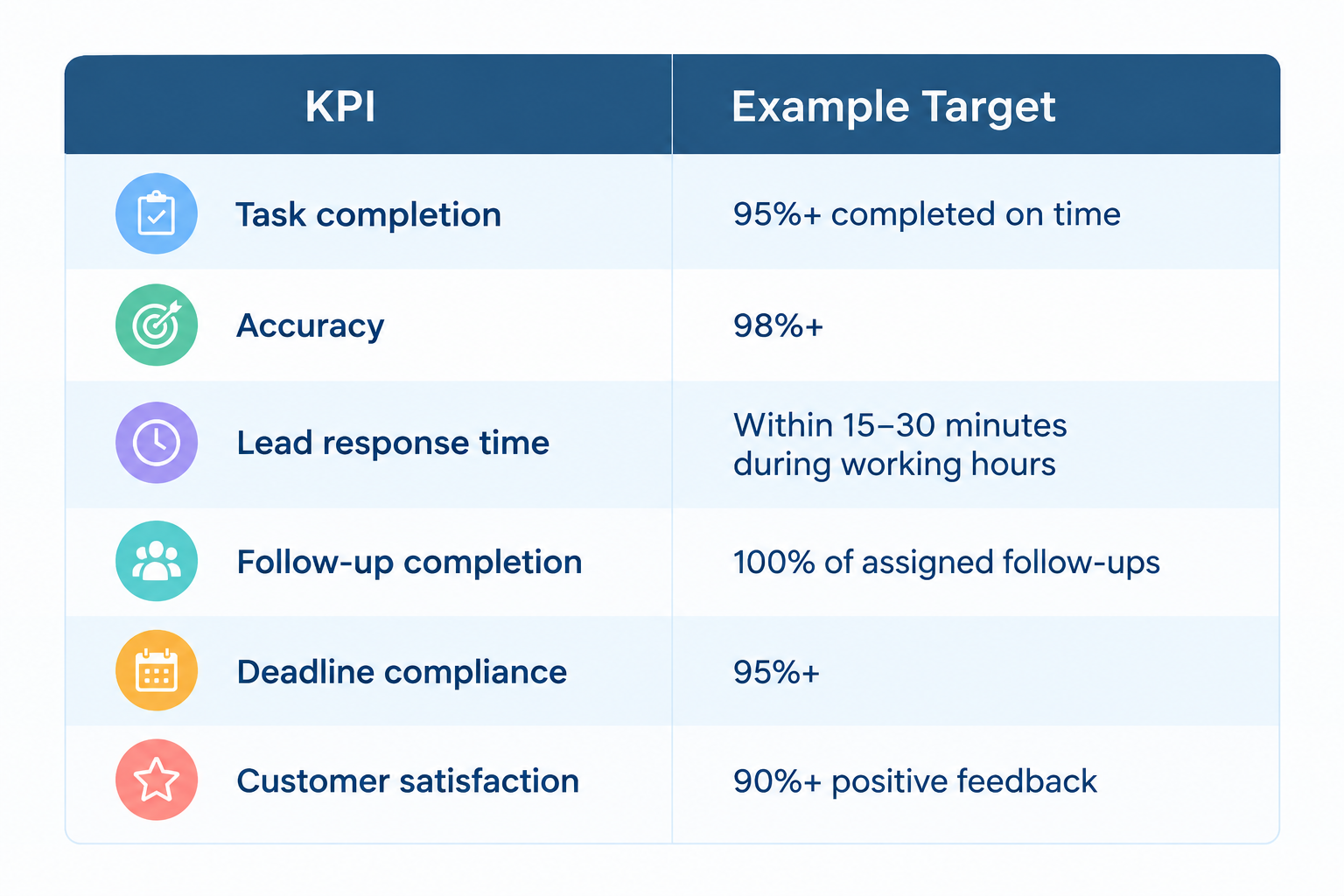
These are examples, not universal standards. Your targets should reflect the VA's role, workload, working hours, and the needs of your business. It is also important to make sure your targets are realistic. A target that looks good on paper but is impossible to maintain will only create frustration.
Use Tools to Make KPI Tracking Easier
KPI tracking does not have to mean creating a complicated spreadsheet every day. You can use the tools your team already works with to collect useful information. Depending on the role, this may include:
- Project management software
- Time-tracking systems
- CRM platforms
- Customer support systems
- Spreadsheets
- Shared dashboards
- Communication platforms
The important thing is to create a consistent process for recording and reviewing the information. If your VA has to spend hours updating a KPI spreadsheet, the system may be too complicated.
Review KPIs Regularly
Tracking KPIs is only useful if you actually review them. A weekly or monthly review can help you identify trends. For example, one missed deadline may not be a serious problem. But if deadlines are missed every week, it may indicate a larger issue.
Look for patterns such as:
- Performance improving over time
- Repeated errors
- Increasing turnaround times
- Workload becoming too large
- Certain tasks taking longer than expected
- Strong performance in some areas but not others
Use these reviews as an opportunity to improve performance and processes, not simply to criticize the VA.
Avoid These Common KPI Mistakes
KPI tracking can become counterproductive when it focuses too much on numbers.

Measuring hours instead of results
Time worked does not automatically equal productivity. A VA who finishes an important task accurately in two hours may provide more value than someone who spends six hours on the same task.
Tracking too many metrics
More data does not always mean better management. Choose the KPIs that directly relate to the VA's responsibilities and your business goals.
Ignoring quality
A high task completion rate means little if the work requires constant corrections. Always consider both quantity and quality.
Using KPIs without context
If performance suddenly drops, do not immediately assume the VA is the problem. There could be a change in workload, software, instructions, priorities, or business conditions. KPIs should help you ask better questions, not replace good management.
Turn KPI Tracking Into a Better VA Management System
KPI tracking works best when it is connected to clear job responsibilities, SOPs, regular feedback, and realistic expectations. Your VA should know:
- What they are responsible for
- How the work should be completed
- What standard is expected
- How performance will be measured
- When performance will be reviewed
When these pieces are in place, KPI tracking becomes much more than a report. It becomes a way to create accountability, identify bottlenecks, improve workflows, and help your virtual assistant succeed.
Final Thoughts
Managing a virtual assistant does not have to mean constantly checking every task they complete. A simple KPI system can give you a clearer view of performance without requiring you to micromanage your remote team. The key is to focus on the metrics that matter: quality, timeliness, productivity, responsiveness, and results. Start with a few KPIs that match your VA's actual responsibilities. Set realistic targets, review the numbers regularly, and use the results to improve both employee performance and your business processes. And if you are still spending too much of your own time managing administrative work, the bigger question may be whether you have the right support structure in place.
Virtual Staff Labs can help businesses build remote support teams that take routine and administrative work off your plate, so you can spend more time focusing on the parts of the business that need your attention.

