
Why Tax Professionals Are Turning to Virtual Assistants
Tax season has a way of exposing every weakness in a tax practice's workflow. The client list grows. Emails pile up. Documents arrive through different channels. Appointments need to be scheduled. Missing information has to be chased down. Clients want status updates. Meanwhile, tax professionals are trying to prepare and review returns, answer complex questions, and meet deadlines.
The problem is that not everything competing for a tax professional's attention actually requires tax expertise.
A virtual assistant can take over many of the administrative and coordination tasks surrounding tax preparation, allowing CPAs, enrolled agents, tax preparers, and accounting teams to spend more of their time on work that requires professional judgment. For firms that experience a major workload increase during tax season, this can be especially valuable. Instead of hiring additional in-house staff for every seasonal spike, a firm can build a support system around a virtual assistant who handles repeatable processes before, during, and after the busy season.
What Is a Virtual Assistant for Tax Professionals?
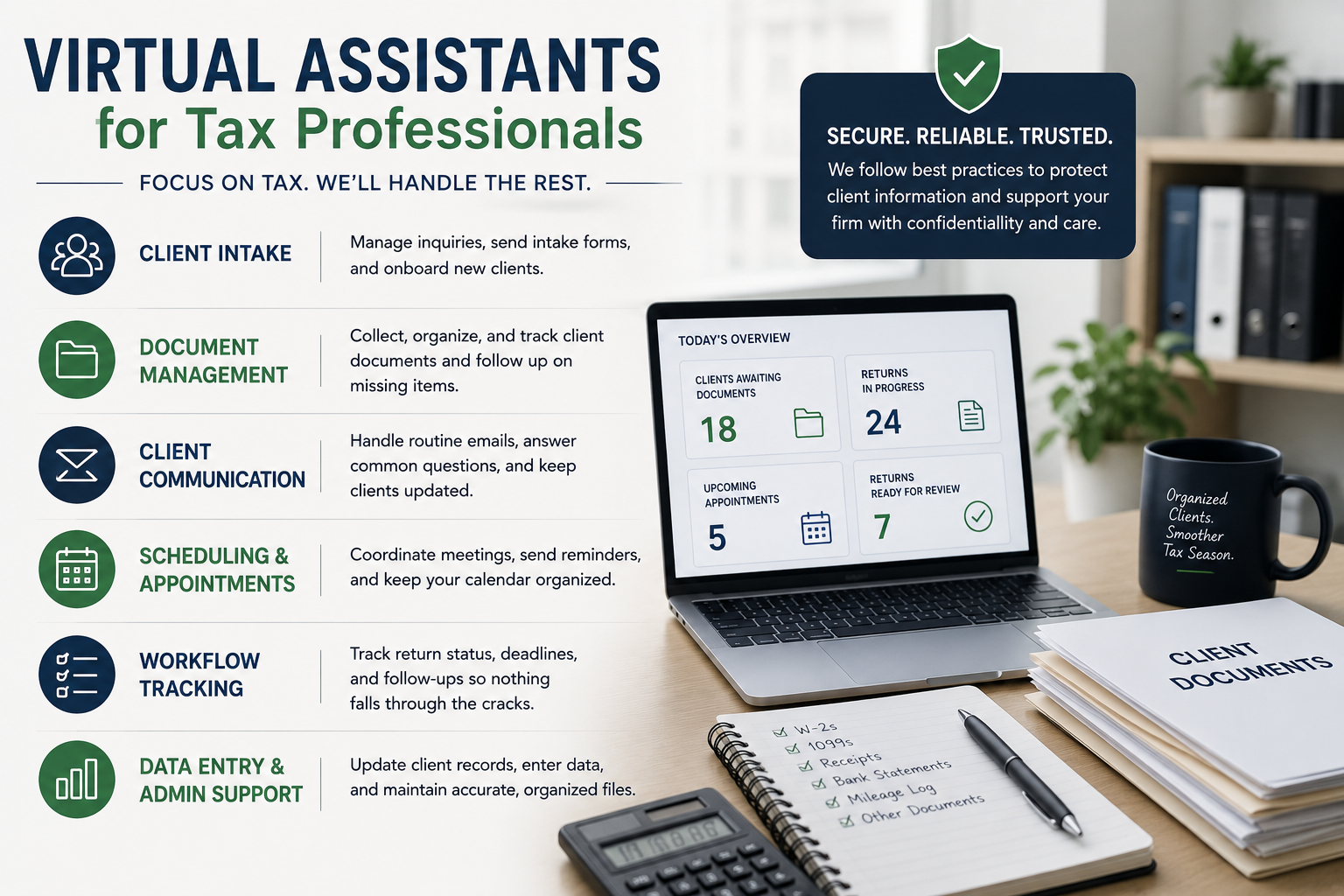
A virtual assistant for tax professionals is a remote support professional who handles administrative, organizational, and other clearly defined support tasks for a tax practice. The role can vary depending on the firm. One tax professional may need help managing a busy inbox and scheduling appointments, while another may need someone to organize client documents, update tracking spreadsheets, or follow up with clients who have not submitted everything required for their returns.
The important distinction is that a VA supports the process around the tax work rather than replacing the tax professional's expertise.
A VA can help keep information moving through the workflow, but tax advice, professional judgment, return review, and other responsibilities that require appropriate credentials or authorization should remain with the qualified tax professional. This division of responsibilities can create a much more efficient workflow.
Why Tax Professionals Need Administrative Support
Tax preparation is detail-heavy work, but the administrative workload surrounding it can be just as demanding.
Consider a typical client file. The client schedules an appointment. The firm sends a document checklist. The client uploads some documents but forgets others. Someone needs to identify what is missing and follow up. Once the documents arrive, they need to be organized and routed to the appropriate person. The client may then send another email asking whether the return is ready. None of these steps is necessarily complicated. But multiply them by dozens or hundreds of clients, and the workload becomes significant.
During tax season, small administrative interruptions can also make it harder for tax professionals to maintain focus on technical work. A CPA who spends several hours each day answering routine emails, checking document status, and coordinating appointments has less time available for return preparation, review, tax planning, and client advisory work. That is where a virtual assistant can make a meaningful difference.

10 Tasks a Virtual Assistant Can Handle for a Tax Practice
The best tasks to delegate are generally repetitive, process-driven, and easy to define with clear instructions. Here are some areas where a tax professional can potentially use VA support.
1. Client Intake
A VA can help manage the administrative side of bringing new clients into the practice. This may include:
- Responding to initial inquiries
- Sending intake forms
- Following up on incomplete forms
- Organizing new client information
- Creating client folders
- Sending engagement-related documents according to firm procedures
- Updating the firm's CRM or client tracking system
Instead of having a tax professional spend time coordinating every new inquiry, the VA can keep the intake process moving and escalate anything that requires professional attention.
2. Document Collection and Follow-Up
Document collection is one of the biggest administrative bottlenecks during tax season. Clients may submit some documents immediately and take days or weeks to provide the rest. A VA can maintain a checklist of required documents, monitor submissions, and send appropriate reminders.
For example, a VA could track whether a client has submitted:
- W-2s
- 1099s
- Mortgage interest statements
- Business records
- Investment statements
- Prior-year returns
- Other documents requested by the tax professional
The VA does not need to determine the tax treatment of those documents. Their job is to help make sure the right information reaches the right person in an organized way.
3. Inbox and Routine Client Communication
Tax professionals often receive emails that do not require a tax professional's expertise. Questions such as:
"Did you receive my documents?"
"Can I schedule my tax appointment?"
"Has my return been sent for review?"
"What documents am I still missing?"
A trained VA can handle routine communication based on approved templates and procedures, while forwarding technical or sensitive questions to the appropriate professional. This gives clients a point of contact without requiring the CPA or tax preparer to personally respond to every administrative message.
4. Calendar and Appointment Management
Scheduling can quickly become chaotic when a tax practice is managing a large client base. A VA can coordinate:
- Initial consultations
- Tax preparation appointments
- Review meetings
- Follow-up calls
- Rescheduling requests
- Appointment reminders
- Calendar updates
The goal is simple: keep the calendar organized so tax professionals can spend their time in scheduled meetings rather than managing the scheduling process itself.
5. Data Entry and File Updates
Tax practices often work with large amounts of client information. Depending on the firm's processes, a VA may assist with approved data-entry tasks, spreadsheet updates, client record maintenance, and information transfer between systems. Some firms may also allow trained support staff to enter basic information into tax preparation software under appropriate supervision. The key is establishing clear boundaries. Data entry is different from making tax judgments. A VA can enter information according to documented procedures, while the tax professional remains responsible for reviewing the information and making the appropriate professional decisions.
6. Tracking Return Status
Clients understandably want to know where their returns stand. A simple status-tracking system can help a tax firm keep everyone aligned. A VA can update whether a client is:
- Waiting for documents
- Ready for preparation
- In preparation
- Waiting for review
- Waiting for client approval or signature
- Ready for filing
- Filed
- Awaiting additional action
This gives the tax team a clearer picture of its workload while reducing the need to search through emails or spreadsheets for updates.
7. Deadline and Follow-Up Tracking
Tax practices operate around deadlines, and missed follow-ups can create unnecessary problems. A VA can maintain internal task lists and reminders for items that require follow-up, such as outstanding documents, client approvals, signatures, appointments, or other administrative steps. Rather than relying on someone to remember every outstanding item, the firm can create a repeatable system where the VA monitors the workflow and escalates issues when necessary.
8. Client Portal and File Organization
A virtual assistant can also help maintain organized digital client files. Depending on the firm's systems and access policies, this may involve:
- Organizing uploaded documents
- Naming files according to firm standards
- Checking whether files were uploaded successfully
- Maintaining folder structures
- Routing documents to the appropriate team member
- Monitoring client portal activity
A consistent filing system becomes especially important when multiple people are working on the same client accounts.
9. Administrative Support After Tax Season
A tax VA does not have to disappear once the April rush is over. The slower months can be an opportunity to improve processes and maintain client relationships.
A VA can support:
- Client follow-ups
- Appointment scheduling
- Database cleanup
- File organization
- CRM updates
- Review requests
- Newsletter or email coordination
- Process documentation
- Client onboarding
- Preparation for the next tax season
This makes the VA a year-round operational resource rather than simply a seasonal solution.
10. General Practice Administration
Every tax firm has its own collection of recurring administrative tasks. These might include preparing reports, updating spreadsheets, coordinating with vendors, maintaining internal records, managing routine correspondence, or documenting standard operating procedures.
The question to ask is not simply, "Can a VA do this?"
Instead, ask:
Does this task require my tax expertise, or does it require reliable execution of a clearly defined process?
If it is the latter, it may be a good candidate for delegation.
What Should Stay With the Tax Professional?
Delegation works best when responsibilities are clearly defined from the beginning. A virtual assistant should not be expected to replace a CPA, enrolled agent, or other qualified tax professional. Depending on the firm's structure and applicable requirements, professional responsibilities such as tax advice, technical interpretation, final review, tax planning decisions, and approval of returns should remain with appropriately qualified professionals. The VA's role is to support the workflow surrounding those responsibilities.
For example, a VA can follow up with a client who has not submitted a document. The tax professional decides which documents are needed and why. A VA can organize information that has been received. The tax professional determines how that information should be treated for tax purposes. A VA can update a return's administrative status. The tax professional remains responsible for the actual tax work and professional judgment.
This distinction makes delegation safer and more useful.
Data Security Matters
Tax professionals handle some of the most sensitive information their clients provide, including Social Security numbers, income information, financial records, and other personally identifiable information. That means outsourcing administrative work cannot simply be about finding someone who is available. Security needs to be part of the process from the beginning.
The IRS advises tax professionals to maintain a written information security plan and implement safeguards for client information. Its guidance also emphasizes limiting access to personally identifiable information, training personnel, establishing security procedures, and using appropriate protections for remote work.
For a tax practice working with a virtual assistant, practical safeguards may include:
- Giving the VA only the access required for their role
- Using firm-managed accounts rather than shared passwords
- Enabling multi-factor authentication
- Using secure file-sharing and client portal systems
- Establishing clear procedures for handling client information
- Training the VA on privacy and security expectations
- Using appropriate confidentiality agreements
- Removing access when the relationship ends
- Documenting what the VA can and cannot access
Tax professionals should also understand the rules that may apply when taxpayer information is shared with third parties. The IRS emphasizes taxpayer control over return information and the importance of consent in circumstances where disclosure or use is permitted. For firms considering offshore or international support, this becomes an especially important area to review with qualified legal or compliance professionals before granting access to taxpayer information.
How a Tax VA Can Help During Busy Season
The biggest advantage of virtual support often becomes obvious when workload increases. Imagine a tax professional starts the day with 20 unanswered client emails, 15 files waiting for documents, several appointments to schedule, and a list of returns that need review. Without administrative support, the tax professional may spend the first few hours working through that list. With a VA, many of the administrative items can already be moving. The VA follows up on missing documents. Appointments are coordinated. Routine client questions are answered. Tracking systems are updated. Files are organized. Issues that require professional judgment are escalated.
The tax professional can then start the day with a cleaner workload and focus on the tasks that actually require their expertise. That does not eliminate the pressure of tax season. It simply prevents administrative work from consuming the same amount of professional capacity.
How to Decide What to Delegate
You do not need to hand over your entire operation to a VA on day one. A better approach is to identify the tasks that are creating the most friction. Start by looking at your calendar and inbox during a typical busy week.
Ask:
What am I repeatedly doing that someone else could do with a checklist?
Then look for tasks that are:
- Repetitive
- Time-consuming
- Administrative
- Process-driven
- Easy to document
- Low-risk when performed within defined boundaries
- Frequent enough to justify delegation
For many tax practices, document follow-up, scheduling, inbox management, client intake, and workflow tracking are good places to start. Once those processes are running smoothly, additional responsibilities can be considered.
How to Set Up a Tax VA for Success
Hiring a VA is only part of the process. The way the role is structured will determine how useful the support becomes.
Create Standard Operating Procedures
Document how recurring tasks should be completed.
Instead of saying, "Follow up with clients," create a process that explains:
- When to send the first reminder
- What template to use
- What information to include
- When to send a second reminder
- When to escalate the client to the tax professional
- Where to record the outcome
Clear procedures reduce guesswork.
Establish Escalation Rules
Your VA should know when to stop and ask for help. For example, a routine scheduling request may be handled independently, while a question about deductions or tax liability should immediately be routed to the qualified tax professional.
Start With Limited Access
Do not give a new VA access to every system simply because they might eventually need it. Begin with the systems required for their initial responsibilities and expand access as the relationship develops.
Measure the Results
Track simple metrics such as:
- Number of outstanding documents
- Client response times
- Number of overdue follow-ups
- Appointment scheduling time
- Administrative hours saved
- Number of client inquiries handled
- Time spent by professionals on administrative tasks
The goal is not just to have a VA. The goal is to build a workflow that works better because the VA is there.
Virtual Assistants Are More Than a Tax Season Solution
Tax season will always come with deadlines and pressure, but tax professionals don't have to handle every administrative task themselves. Chasing documents, scheduling appointments, updating records, and answering routine client questions can take valuable time away from higher-priority work.
A virtual assistant can provide reliable support with these day-to-day tasks, helping tax firms stay organized, reduce interruptions, and deliver a smoother client experience.
At Virtual Staff Labs, we help businesses delegate time-consuming administrative work to reliable remote support. For tax professionals, this can mean more time focused on clients and tax work while routine tasks keep moving in the background.
The goal isn't to delegate everything. It's about identifying the right tasks to hand off and creating a workflow that works better.
Instead of asking, "How can I get through more work?"
Ask:
"Which parts of my workload should I stop doing myself?"